Community Training Classes & Labs > F5 Programmability Training Index
Lab 2.3: Create Tenant & BIG-IP Connector
iWorkflow implements a Tenant/Provider interface to enable abstracted deployment of L4-7 into various environment. In conjuction iWorkflow Connectors serve as the L1-3 Network and Device Onboarding automation component in the automation toolchain. iWorkflow supports Connectors for various vendor integrations (F5 vCMP, F5 BIG-IP, Cisco APIC, vmWare NSX, etc.) In this lab we will create a ‘BIG-IP Connector’ for the BIG-IP devices in the lab deployment. This connector will then allow you to drive a fully automated deployment from the iWorkflow Service Catalog.
Task 1 – Create a Tenant and Tenant User
In this task we will create a Local Connector that is linked to our BIG-IP devices. The Local Cloud Connector is DSC aware and will automatically detect that the BIG-IP devices are clustered and configure itself accordingly.
Perform the following steps to complete this task:
- Expand the “Lab 2.3 – Create Tenant & Local Connector” folder in the Postman collection.
- Click the “Step 1: Create iWorkflow Tenant” item in the collection and click
‘Send’. This request will create a tenant named
MyTenant. - Click the “Step 2: Create Tenant User” item in the collection and click ‘Send’. This request will create a tenant user.
- Click the “Step 3: Assign User to Tenant Admin Role” item in the collection
and click ‘Send’. This request will assign the Admin role for the
MyTenanttenant to thetenantuser.
Task 2 - Create a Local Connector
Click the “Step 4: Create a Local Connector” item in the collection. We will create a new connector by performing a POST to the local connector collection. If you examine the JSON body you can see we are providing a reference to the URL for the BIG-IP-A device (using the UUID environment variable we populated earlier):
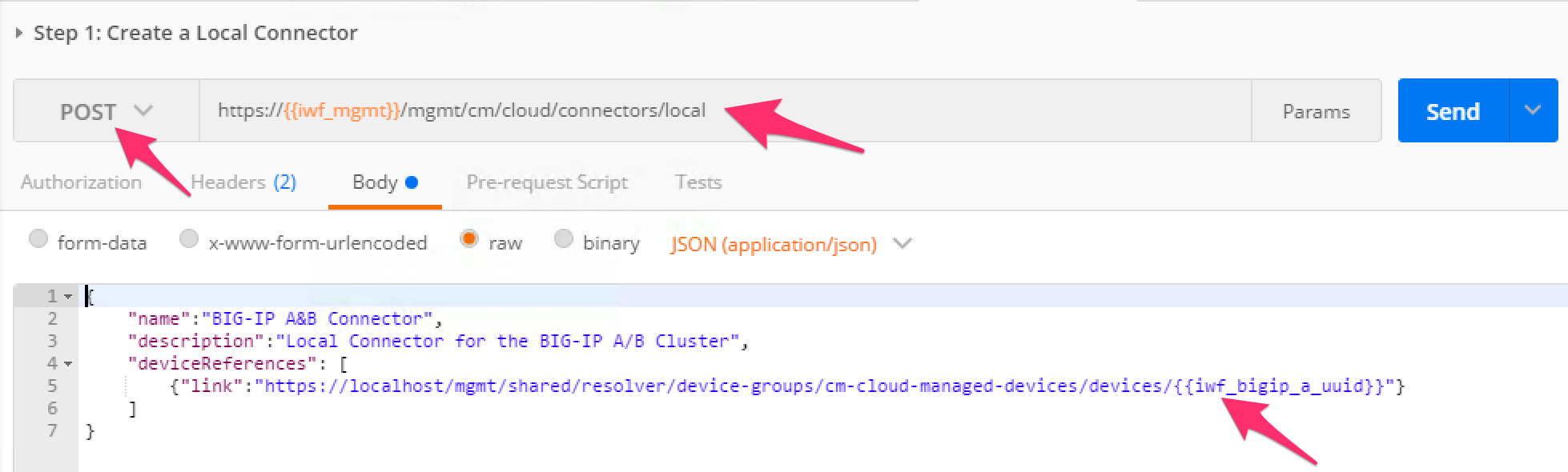
Click the ‘Send’ button to create the connector.
Click the “Step 5: Get Local Connectors” item in the collection and click ‘Send’. Examine the output to see how the connector was configured. Take note of the reference to the ‘device-group’. This is how the connector determines the HA state of the underlying BIG-IP devices. Find the ‘connectorId’ of the connector and update your Postman environment to include the ‘connectorId’ as the value of the ‘iwf_connector_uuid’ variable:


Click the “Step 6: Assign Connector to Tenant” item in the collection. This request will assign this connector to to the ‘MyTenant’ tenant allowing service deployments from that tenant. Click the ‘Send’ button and examine the response.